
Distribute traffic efficiently across multiple servers to enhance scalability, ensure uptime, and improve application performance.
CloudRaya Load Balancer
Deploying Load Balancer in Minutes
CloudRaya makes it easy to set up a load balancer with just a few clicks, ensuring smooth traffic distribution for your applications.
Try Now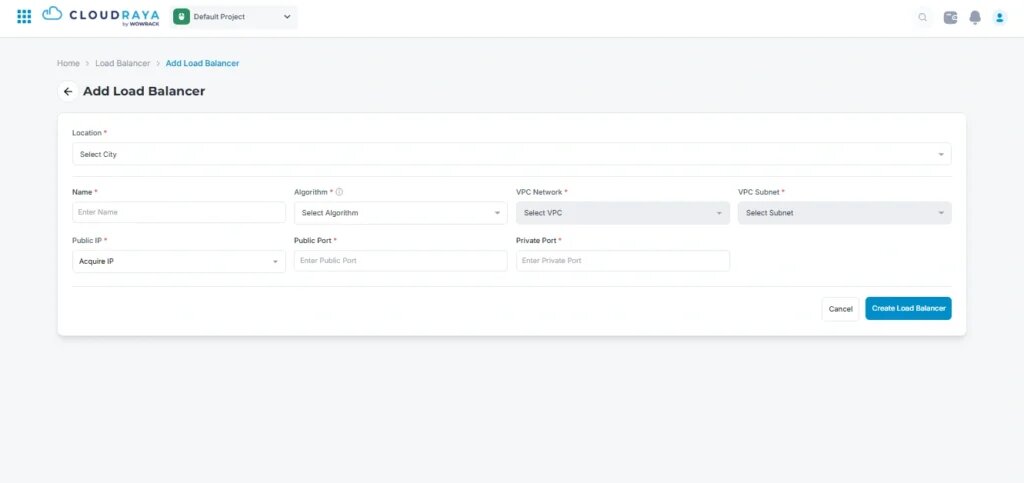
Use Case

Ensure High Availability for Applications
Prevent downtime with automatic failover and traffic distribution.

Handle Growing Traffic with Scalable Infrastructure
Distribute workloads efficiently as demand increases.

Perform System Updates Without Disruptions
Redirect traffic seamlessly while applying updates.

Optimize Cloud Service Performance
Balance loads intelligently to maintain stability and efficiency.
Why Choose CloudRaya Load Balancer?
Efficient traffic distribution for high availability and optimized server performance.

Improve Scalability and Availability
Automatically distribute application traffic to ensure stable performance and zero downtime.

Minimize Downtime Risks
Ensure continuous availability by distributing traffic evenly across multiple servers.

Enable Safer Maintenance
Perform system updates without disruptions by directing traffic to active servers.

Optimize Public IP Management
Simplify traffic routing with a single public IP instead of multiple unique addresses.

Intelligent Traffic Distribution
Efficiently balance loads based on real-time server health, ensuring fast and stable performance.

Multiple Load Balancing Algorithms
Choose from round-robin, least connections, or IP-hash methods to optimize resource allocation.
Frequently Asked Question
Find answers to common questions about us and our features. From account and billing related to technical questions, we've got you covered. Can't find the answer? Contact us!
CloudRaya load balancer is a service that automatically distributes traffic across multiple servers to prevent overload on a single point.
By balancing traffic evenly, your application can run more reliably and perform optimally, even during traffic spikes.
With CloudRaya, you can deploy a load balancer in just a few clicks through the dashboard.
Yes. A load balancer improves application performance by directing user requests to the most available server.
With a load balancer, you can:
- Prevent overload on a single server
- Maintain application stability during traffic spikes
- Optimize performance by distributing requests to less busy servers
- Minimize downtime when a server is under maintenance or experiencing issues
This efficient traffic distribution helps your application run faster, more stable, and more reliable.
You should start using a load balancer when your application begins to experience increasing traffic or runs on multiple servers.
Consider using a load balancer if:
Performance drops during peak traffic
You want to prevent downtime during traffic spikes
You need a more resilient system that doesn’t rely on a single server
You are preparing a scalable architecture
Using a load balancer early helps maintain performance and stability as your application grows.
Yes. CloudRaya load balancer not only distributes traffic but also helps enhance application security.
It supports:
SSL/TLS for secure connections
End-to-end encryption setup
Separation of public and private traffic
These features help strengthen your overall application security architecture.
You can configure a load balancer directly from the CloudRaya dashboard with the following steps:
Log in to the CloudRaya dashboard
Select the project where you want to add a load balancer
Go to the load balancer menu
Define the service name and location
Add target servers (IP address or cloud instances)
Choose the appropriate load balancing method
Configure additional settings such as SSL and health checks
Apply the configuration and start distributing traffic
Once active, you can monitor performance and traffic in real-time through the dashboard.
Basically, CloudRaya load balancer is free. You only need to pay for the Public IP for Rp100,800 per month.
With this fixed pricing, you can use the service without worrying about additional charges based on traffic.
It is not mandatory, but highly recommended if your application needs to be ready for traffic spikes, such as in e-commerce use cases.
By using a load balancer early, you can prevent potential downtime as traffic grows.
Yes. You can modify configurations such as target servers, load balancing methods, and additional settings at any time through the CloudRaya dashboard.
Other Features

Marketplace
Find trusted software, licenses, and cloud solutions in one place, with easy setup, flexible plans, and expert support.

Virtual Machine
Deploy VPS quickly with CloudRaya Virtual Machine (VM), designed to support business needs from lightweight computing to high-performance workloads.

CloudRaya Container Registry
CloudRaya Container Registry (CCR) is a highly secure and scalable container image registry to simplify your container image storage needs.

KubeRaya
Take out Kubernetes complexity. KubeRaya simplify Kubernetes deployment and management for you.

StorageRaya
Store and access your data anytime. StorageRaya is an s3-compatible object storage that will scale with you.




US Headquarter
12201 Tukwila International Blvd #100,
Tukwila, Washington 98168
United States of America
APAC Headquarter
Menara BCA 50th Floor Unit 4546
Jl. MH Thamrin No.1
Jakarta Pusat, 10310
Indonesia

Get Our Latest Updates and News
Features
Resources
Company
Payment Method


Terms of Use
|
Privacy Policy
|
Cookie Preference
© 2026 CloudRaya and its affiliates. All rights reserved.